 JawAtlas
How to
JawAtlas on iPad: the 2x2 MPR grid and Split View
After this page you will know what changes on the larger screen, how to study with a textbook open next to the scan, and how to put the app on a classroom display.
The 2x2 grid
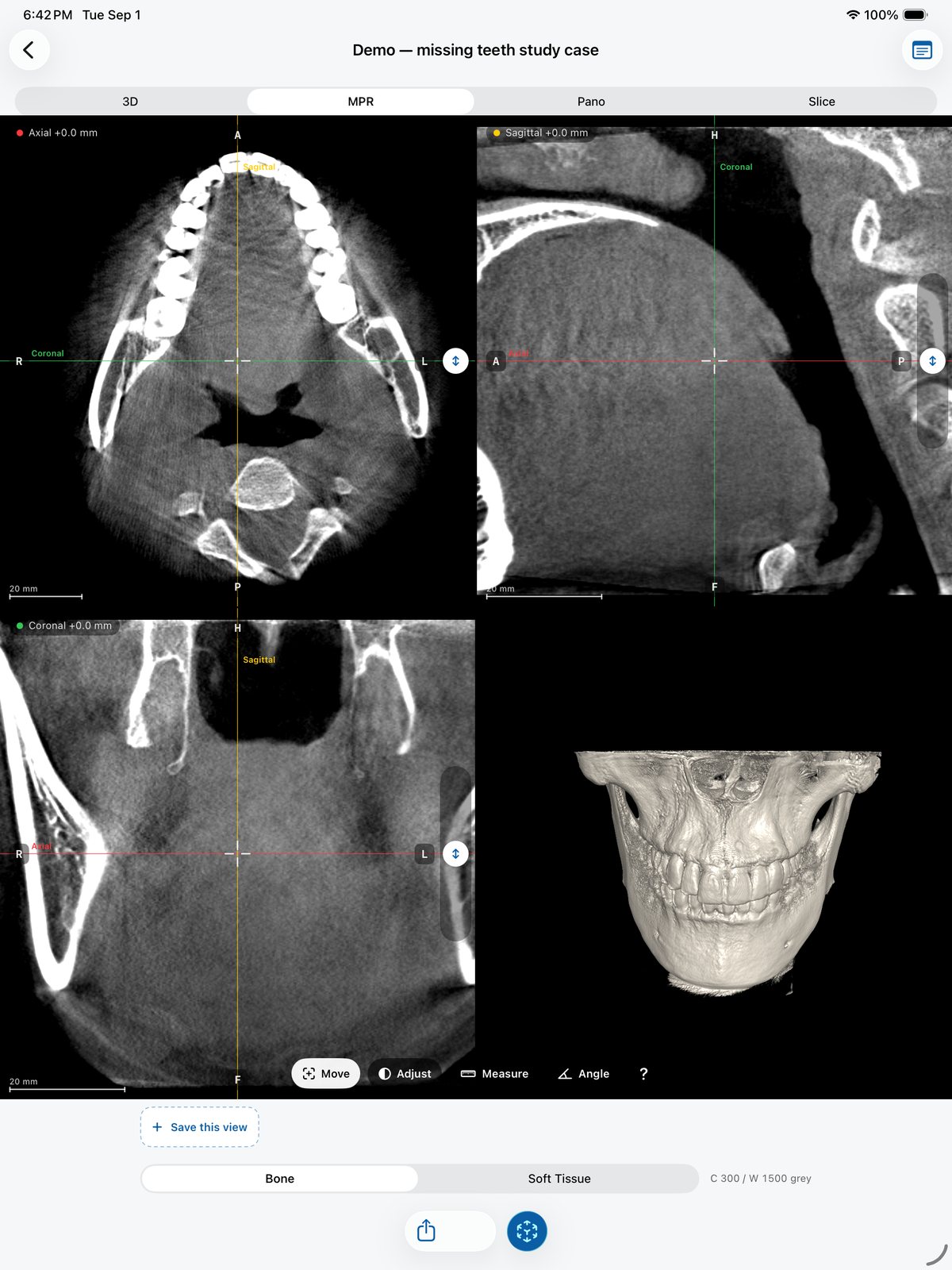
On iPad the MPR stage shows four panes at once: axial at the top left, sagittal at the top right, coronal at the bottom left and a live 3D rendering at the bottom right. The white crosshair is shared, so a tap in any pane moves the other two slices to the same point, and the coloured scout lines (red axial, green coronal, yellow sagittal) show where each plane cuts the others. The 3D pane follows the same window preset and rotates with a drag. This is the layout that makes tri-planar MPR click for most students, because cause and effect are visible on one screen.
The grid appears whenever the pane is at least about 680 points wide, which on every current iPad means landscape and most full-screen portrait layouts. Below that width the stage falls back to the single pane with the "Axial", "Coronal" and "Sagittal" chips.
Steps: study with a textbook in Split View
- Open JawAtlas full screen and choose MPR. Start in landscape so you see the grid.
- Add a second app. Use the iPadOS multitasking control at the top of the screen (the three dots) and choose Split View, then pick Books, a PDF reader, Safari or your notes app. The exact gesture depends on the iPadOS version; this is a system feature, not a JawAtlas one.
- Set the split. Drag the divider so JawAtlas keeps roughly two thirds of the width if you want the 2x2 grid; give it half and you get the single-pane layout, which is still fine for reading along.
- Work through a chapter. With a textbook figure of, say, the maxillary sinus on one side, find the same structure on the demo scan on the other and save a moment for each figure you match.
- Take notes in the case. Tap the note icon at the top right of the case for "Case Notes", or keep your own notes app in the other half of the screen.
Touch and Apple Pencil
Everything in JawAtlas is a touch gesture: drag to move the crosshair or rotate the 3D view, pinch to zoom, double-tap to reset, drag the slider to scroll a stack, draw to mark. Apple Pencil performs all of these as a touch input, and many people prefer it for marks in the Slice stage because the line lands exactly under the tip. There is no Pencil-specific behaviour beyond that: no pressure, no tilt, no hover and no Pencil-only tools. Marks and moments are described on Save and replay moments.
Projecting to a classroom display
Use AirPlay screen mirroring from Control Centre to an Apple TV or an AirPlay-capable display, or connect a USB-C to HDMI adapter. Both are iPadOS features and mirror the whole screen, so what you see is what the room sees. The 2x2 grid reads well from the back of a lecture hall because each pane is large; switch to a single pane and zoom in when you want to point at a detail. The AR view mirrors too, which lets a whole group watch one student slice through the jaw. Ideas for structuring a session are on JawAtlas for educators.
If it does not work
The grid does not appear. JawAtlas is narrower than about 680 points. Rotate to landscape, widen the split, or close the second app.
The 3D pane is black. The case is still loading ("Preparing volume…"), or the window is far off the presets. Wait, or tap "Bone".
Drawing with the Pencil scrolls the stack instead. You are not in marking mode. In the Slice stage, tap the pencil button at the top right first.
The display shows only the iPad wallpaper. Screen mirroring is off. Open Control Centre, tap Screen Mirroring and pick the display.
Questions students ask
Why do I sometimes get one pane instead of the 2x2 grid on iPad?
The grid needs about 680 points of width. In portrait, in a narrow Split View or in Slide Over the MPR stage switches to the single-pane layout with the Axial, Coronal and Sagittal chips, exactly as on iPhone. Rotate to landscape or widen the split to get the grid back.
Does JawAtlas support Apple Pencil?
Pencil works as a touch input: you can draw marks, move the crosshair and tap points with it like a finger. There is no Pencil-specific behaviour such as pressure sensitivity or hover, and no palm rejection beyond what iPadOS provides.
Can I show JawAtlas on a projector?
Yes, with AirPlay screen mirroring, which is an iPadOS feature, or with a USB-C to HDMI adapter. The whole screen is mirrored, so the 2x2 grid, the moment strip and the AR view all appear on the display.
JawAtlas is an education and training aid. It is not a medical device and must not be used for diagnosis, treatment planning or any clinical decision.
Last reviewed 2026-10-13